Patrol Supervision · Real-Time
Real-Time Guard Tour Systems: What "Real-Time" Should Actually Mean

"Real-Time" Is the Most Overused Word in Guard Tour Software
Almost every guard tour product claims to be a real-time guard tour system. The word sounds precise, but it usually is not. One vendor means a dot moving on a map. Another means reports that refresh every few minutes. A third means alerts. When you compare systems, the first job is to ask which "real-time" they mean.
The Four Meanings of Real-Time
| Meaning | What you see | What it is good for | The catch | In Trinity Guard® |
|---|---|---|---|---|
| Live location | Where an officer is right now | Emergencies, lone-worker checks | Constant tracking drains batteries and raises privacy concerns | No continuously moving dot. While the phone is online, each completed GPS point shows up as the officer reaches it; the route is available afterwards |
| Live checkpoint feed | Scans as they happen | Verifying a round as it is walked | A scan only proves presence if it cannot be faked | Each QR scan is validated by AI on the server as it happens |
| Exception alerts | A warning when something does not happen | Catching missed starts without watching a screen | Only as good as the rules behind it | Push notifications before shifts and tasks; the admin is notified if a shift or task is not started within 20 minutes; immediate notification for skipped subtasks |
| Live communication | Chat, voice, photos from the field | Instructions, clarifications, evidence | Depends on coverage | Chat, voice messages, dictation, incident reports with photos |
Most supervisors do not need all four equally. A night supervisor covering ten sites cannot watch ten live maps. What they need is proof that arrives by itself when something happens, and a way to reach the officer when it matters.
Why There Is No Moving Dot
It is a fair question, because a moving dot looks impressive in a demo. We chose a different model: a patrol is defined by the points an officer has to touch, and every touch is verified. A dot that passes near a checkpoint proves nothing about whether the checkpoint was actually inspected. A verified point does, and while the phone is online it appears in the system as soon as the officer completes it.
Location is also a privacy and trust question. Continuous tracking of a person for a whole shift is hard to justify and easy to resent, and officers who feel watched tend to work around the tool. In Trinity Guard®, GPS runs only while a patrol task is active, and the route can be pulled up afterwards.
What a Supervisor Actually Needs at 3 a.m.
The most common patrol failure is not a missed checkpoint in the middle of a round. It is a round that never starts. The officer is in the car, in the guard shack, or asleep, and nobody knows until the morning report, if then. We wrote about that window in the 3 a.m. gap in night security patrols.
So the first real-time question is simple: if a scheduled patrol does not start, how fast does the system tell someone?
What Trinity Guard® Does in Real Time
- Push notifications before shifts and tasks. Several notifications go out ahead of a shift or task, so a start is not forgotten.
- Missed start alerts. If a shift or a task has not been started within 20 minutes, the admin is notified. The start time itself is recorded when the officer starts in the app, as covered in real shift start verification.
- Skipped subtasks. If a subtask of a patrol task is left out, an immediate notification goes out.
- Live scan validation. Every QR checkpoint scan is sent to the server and validated by AI as it happens, including a check for photographed codes. See how photographed QR codes get caught.
- GPS points as they are completed. While the phone is online, a GPS point appears in the system as soon as the officer completes it.
- Incidents with photos. An incident report with photos arrives as soon as the officer files it.
- Vehicle entries and exits. At gates, each vehicle in and out is logged by the guard on post and is visible right away. See vehicle entry and exit without paper logs.
- Live communication. Officers and supervisors can use in-app chat, voice messages and dictation.
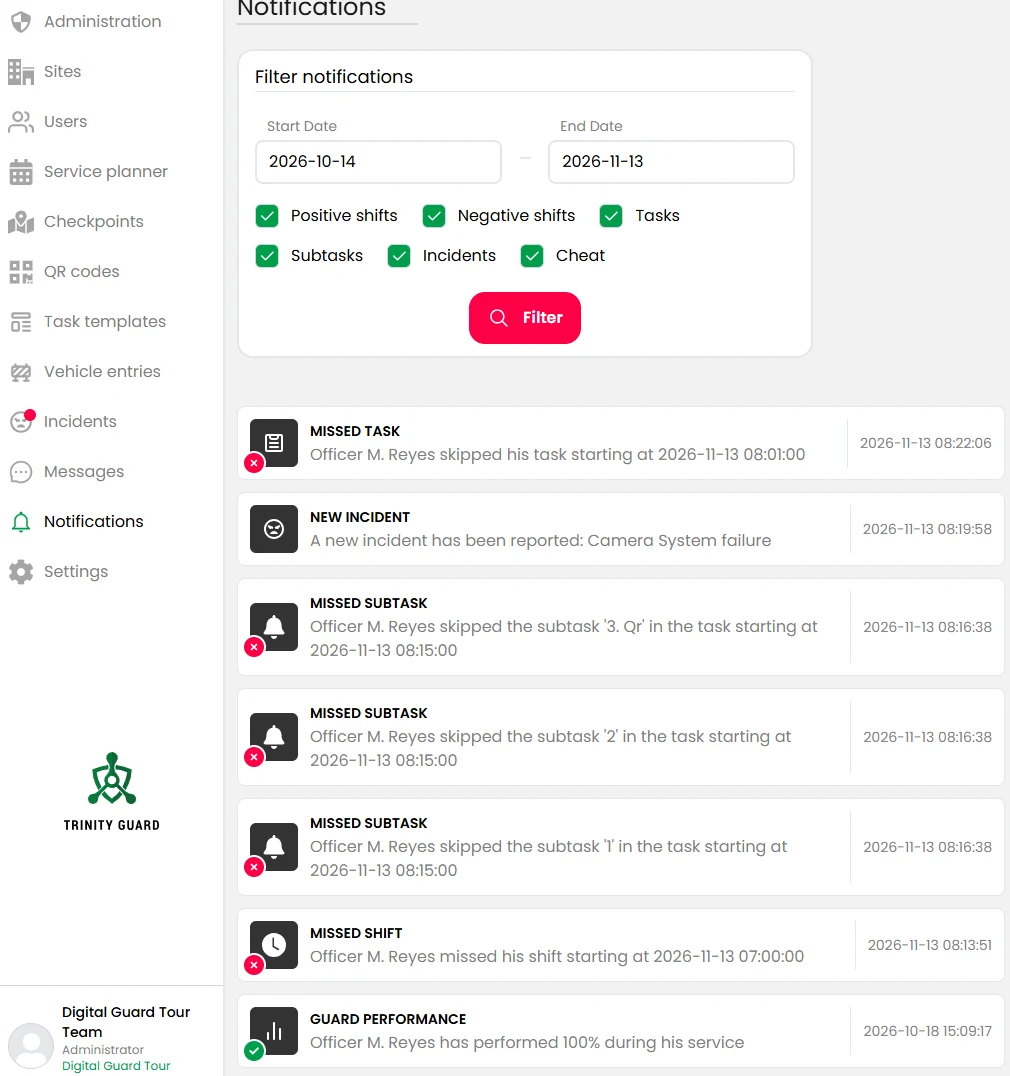
For how supervisors follow active patrols day to day, see active patrol monitoring.
Where Real-Time Stops, Honestly
No continuously moving dot. Trinity Guard® does not draw an officer's position second by second. It records location as part of patrol activity, from the moment a task starts, shows completed GPS points when the phone is online, and lets you pull up the route afterwards. For reviewing those, see patrol route history reports.
Indoor rounds need a connection. QR scans are validated on the server, so an indoor QR round needs internet during the round. Shift start and close need it too.
Outdoor GPS patrols without coverage. GPS-based outdoor patrols keep working offline: the phone collects the completed GPS coordinates and uploads them when it is online again, and from then on they appear in the system. That is the right behavior for a large yard or a perimeter fence, but it means those points show up after the upload, not as they happen. The trade-off is explained in offline guard tour systems.
Notifications depend on the phone and the network. Push delivery relies on the device, its settings and its connection.
Six Tests to Run During a Pilot
- Skip a start. Schedule a shift and a patrol task and deliberately do not start them. Time how long it takes for the notification to arrive.
- Leave out a subtask. Start a task, skip one subtask and check that the notification comes immediately.
- Scan a photo. Photograph a checkpoint and try to scan the photo. See what the supervisor sees.
- File an incident from the far corner. Take two photos and check how quickly the report shows up.
- Send a voice message. Check that the officer can hear and answer it while walking.
- Walk a dead zone. On an outdoor GPS round, walk through a spot with no signal and confirm that the completed points appear after the phone is online again.
If a vendor's real-time claims survive these six tests, they mean something. The setup for a test site is in the 14-day pilot guide.
The Short Version
Real-time is not a map. It is how quickly the right person finds out that something happened or did not happen, and whether they can trust what they see.
Key Facts
- "Real-time" in guard tour software can mean live location, a live feed of checkpoint scans, exception alerts or live communication, and vendors rarely say which.
- Trinity Guard® has no continuously moving dot; while the phone is online, a completed GPS point appears as soon as the officer reaches it, and the route can be pulled up afterwards.
- If a shift or a task is not started within 20 minutes, the admin is notified; skipped subtasks trigger an immediate notification, and push notifications go out before shifts and tasks.
- Trinity Guard® validates QR checkpoint scans with AI on the server as they happen, and delivers incident reports with photos as soon as they are filed.
- Vehicle entries and exits, chat and voice messages are visible and delivered as they are logged or sent.
- Offline, the phone collects completed GPS coordinates and uploads them when it is online again; indoor QR rounds need an internet connection.
FAQ
It can mean live officer location, a live feed of checkpoint scans, exception alerts or live communication. Ask each vendor which of these they mean and test it during a pilot.
There is no continuously moving dot on a map. While the phone is online, each GPS point appears in the system as soon as the officer completes it. GPS runs only while a patrol task is active, and the route can be pulled up afterwards.
Yes. If a shift or a task is not started within 20 minutes, the admin is notified by push notification, and skipped subtasks trigger an immediate notification. Several push notifications also go out before a shift or task starts.
The shift and task start time, QR checkpoint scans validated by AI on the server, completed GPS points while the phone is online, incident reports with photos, vehicle entries and exits, and chat and voice messages arrive as they happen.
Yes. The phone collects the completed GPS coordinates offline and uploads them when it is online again, and from then on they appear in the system. They do not show up while the phone has no connection.
Run a 14-day pilot and try six tests: skip a start, leave out a subtask, scan a photo of a checkpoint, file an incident with photos, send a voice message, and walk a GPS round through a dead zone.
Run a 14-Day Guard Tour Pilot
Skip a patrol start on purpose and see how fast you find out. Then decide. No hardware, no credit card.
Start your pilot →About the author: Gyula Györfi is the founder of Trinity Guard® and a former police commander with 26 years of police service, 18 of them in command. He builds patrol software that has to work where security work actually happens: on the phone in an officer's hand, on a night shift.