Security Guard Tracking System: GPS Patrol Tracking Without Background Surveillance
A modern security guard tracking system should prove assigned patrol work — not follow guards unnecessarily all day. This guide explains how GPS, QR checkpoints, dashboards, and AI-assisted review create verified patrol records without turning field operations into constant personal monitoring.
 Gyula GyörfiSecurity Operations Specialist & Veteran Police Commander · Founder of Trinity Guard®
Patrol Tracking Should Prove Work — Not Monitor People All Day
Security companies need to know whether patrols were completed, which checkpoints were missed, when incidents happened, and what evidence can be shown to clients. But that does not mean guards should be tracked all day, everywhere, outside assigned work.
The right system does something more precise: it verifies patrol activity during the assigned shift or task, creates a trustworthy operational record, and gives supervisors real visibility without turning guard management into constant personal monitoring.
That distinction matters.
For U.S. security companies, property managers, logistics sites, campuses, industrial facilities, and multi-site operations, patrol tracking is no longer just about watching dots on a map. It is about accountability, client-ready proof, and operational records that can be trusted when questions come up.
A security guard tracking system should verify assigned patrol work, not monitor guards unnecessarily in the background. GPS patrol tracking is most useful when it is tied to a specific shift, task, or patrol route. Background tracking should not be active when the guard is not performing assigned patrol work. QR checkpoints add stronger proof for indoor areas, doors, control rooms, basements, and locations where GPS is weak. The best security guard tracking software combines GPS, QR checkpoints, incident reporting, supervisor visibility, and client-ready records in one system. Digital Guard Tour uses GPS, QR, and AI-assisted patrol review to help security teams prove what happened in the field without proprietary hardware.




1What Is a Security Guard Tracking System?
A security guard tracking system is software that helps security companies verify patrol activity, monitor assigned routes, review missed checkpoints, and document field events.
In older systems, tracking often meant paper logs, radio check-ins, or RFID wand scans. Those tools could show that something was recorded, but they often failed to prove what actually happened in the field.
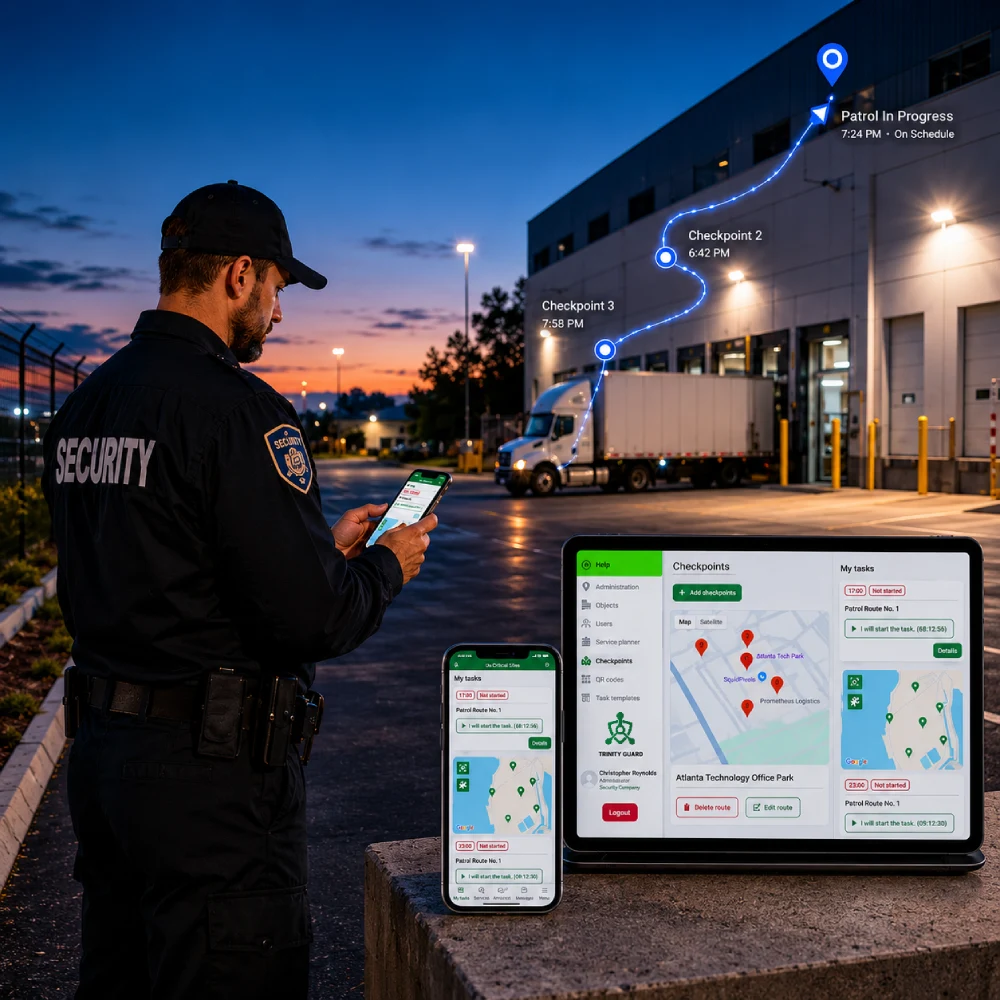
A modern security guard tracking system works differently. Guards use a mobile app during assigned patrol work. Supervisors review patrol progress, checkpoint activity, incident reports, timestamps, and location context from a web dashboard.
The goal is not to collect data for its own sake. The goal is to create reliable operational proof.
A good system should help answer practical management questions:
That is the real value of security guard tracking software. For field teams, it should also work as a practical security guard app that guards can use during real shifts.
Atomic truth: A patrol system should verify assigned work, not follow guards unnecessarily all day.
2Tracking vs. Verification: The Difference Security Companies Must Understand
Many buyers use the word “tracking,” but what they really need is verification.
Tracking alone shows location. Verification proves work.
A basic GPS tracker may show that a phone moved around a property. But movement is not the same as a completed patrol. A guard can walk past a critical door without checking it. A vehicle can drive through a yard without inspecting the fence line. A dot on a map does not automatically prove that the required security task was done.
Patrol verification connects location, time, identity, checkpoints, and field actions into one operational record.
That is why GPS should be part of the system, not the whole system.
For outdoor routes, a GPS patrol system helps supervisors confirm that guards covered the property, reached remote areas, and did not stay in one place while claiming the rounds were completed. For indoor or high-risk checkpoints, QR verification adds a required interaction. The guard must physically reach the checkpoint and scan the assigned QR code during the active patrol.
Together, GPS and QR create a stronger proof model than either method alone.
Atomic truth: Tracking shows where a phone moved. Verification proves whether assigned patrol work was actually completed.
3Why Background GPS Tracking Creates Problems
Security teams need accountability. Guards also need a system they can accept and use.
If software tracks guards continuously outside assigned patrol work, it can create unnecessary friction, privacy concerns, and adoption problems. Guards may feel monitored rather than supported. Supervisors may receive more location data than they can realistically review. Companies may create unnecessary liability without gaining better operational proof.
Most security companies do not need to know where a guard is every minute of the day.
They need to know whether assigned work was completed during the shift.
That is why patrol-based tracking is a better model.
GPS should activate in the context of assigned work: a shift, a patrol, a task, or a route. When the patrol is not active, the system should not behave like a personal surveillance tool.
This makes the system easier to explain, easier to adopt, and more focused on what clients actually care about: verified service delivery.
Atomic truth: GPS tracking only matters when it supports a real security task.
4How Patrol-Based GPS Tracking Works
In a patrol-based security guard tracking system, the workflow is simple:
- A supervisor creates a site, defines checkpoints, assigns patrol tasks, and sets the expected operational structure.
- The guard starts the assigned shift or patrol in the mobile app.
- GPS tracking begins only when the guard begins the assigned patrol activity.
- The system records movement, timestamps, checkpoint activity, and related field events during the patrol.
- QR checkpoints can be scanned where physical confirmation is required.
- Incident reports can be added with photos, notes, time, and location context.
- Supervisors review the activity from the web dashboard.
This gives management a clear view of patrol execution without requiring manual phone calls, paper logs, or end-of-shift guesswork.
Instead of asking, “Did you complete the rounds?” supervisors can review what actually happened.
Atomic truth: GPS tracking only starts when the guard begins the patrol.
5Why QR Checkpoints Still Matter
GPS is powerful outdoors, but it is not perfect everywhere.
Warehouses, stairwells, basements, underground parking garages, hospitals, hotels, apartment buildings, and industrial interiors can all create weak or inaccurate GPS signals.
That is where QR checkpoints matter.
A QR checkpoint confirms that the guard physically interacted with a specific point. This is especially useful for locked doors, fire exits, server rooms, mechanical rooms, loading docks, control rooms, elevators, stairwells, remote indoor corridors, and critical inspection points.
For many real sites, the best patrol tracking model is not GPS or QR. It is GPS plus QR.
GPS shows the broader route context. QR confirms the exact checkpoint interaction. That combination creates a more defensible patrol record inside a complete guard tour patrol system.
Atomic truth: GPS proves movement. QR proves interaction.
6What Supervisors Should See in a Tracking Dashboard
A security guard tracking system should make supervisors faster, not busier.
A good dashboard should show the information that matters most: active guards and assigned sites, current patrol status, completed checkpoints, missed checkpoints, delayed patrols, incident reports, route history, shift activity, exception alerts, and exportable reports.
The system should help supervisors identify the patrol records that need attention instead of forcing them to manually review every routine action.
This is where AI-assisted review becomes valuable.
AI should not replace supervisors. It should help them focus on incomplete patrols, suspicious timing, missed tasks, QR manipulation attempts, and unusual patterns that deserve human review.
The strongest systems do not simply store patrol data. They help supervisors understand it.
Atomic truth: Supervisors do not need more noise. They need the exceptions that matter.
7Client-Ready Patrol Proof
Security companies do not win trust by saying, “The patrol was completed.”
They win trust by showing clean, verified records.
Clients increasingly expect proof of service. They want to know that guards reached required areas, responded to incidents, and documented what happened during the shift.
A modern security guard tracking system should support client-ready reporting, including patrol history, checkpoint completion, missed checkpoint visibility, incident evidence, timestamps, location context, XLS exports, and read-only client access where appropriate.
This turns patrol tracking into a business advantage.
When a client asks what happened, the security company can answer with records instead of memory, screenshots, or handwritten notes. That matters during contract reviews, complaints, insurance questions, and renewal conversations.
Atomic truth: If patrol work cannot be verified, it becomes an opinion instead of evidence.
8Security Guard Tracking Software Buyer Checklist
Before choosing security guard tracking software, security company owners and operations managers should ask practical questions.
- Does the system verify patrol work or only show GPS movement?
- Does GPS tracking start only during assigned patrol activity?
- Does the system avoid unnecessary background tracking?
- Can guards use existing smartphones?
- Are QR checkpoints supported for indoor locations?
- Can supervisors review completed and missed checkpoints?
- Can incident reports include photos, notes, timestamps, and location context?
- Can clients receive clean, read-only proof when needed?
- Can reports be exported for audits and contract reviews?
- Can AI help identify suspicious patterns or incomplete patrols?
- Is the system simple enough for guards to actually use during real shifts?
The best system is not always the one with the longest feature list. It is the one that creates reliable proof without slowing down field operations. For the broader category, see our complete guard tour system guide.
Where Digital Guard Tour Fits
Digital Guard Tour is built for security companies and operations teams that need verified patrol activity without unnecessary hardware or background surveillance.
Guards use a mobile guard tour app during assigned patrol work. Supervisors use a web dashboard to review patrol status, checkpoint completion, incidents, route history, and reports.
The system supports GPS patrol tracking for outdoor routes, QR checkpoint verification for precise locations, incident reporting with evidence, and AI-assisted review through Trinity Agent.
The result is a practical security guard tracking system focused on accountability, not constant surveillance.
- No proprietary RFID scanners.
- No paper-based patrol workflow.
- No more taking their word for it.
Just verified patrol work, structured records, and supervisor visibility.
Security Guard Tracking System FAQ
A security guard tracking system is software that helps security companies verify assigned patrol work, review completed and missed checkpoints, document incidents, and create client-ready patrol records.
No. GPS tracking shows where a phone moved. Patrol verification connects location, time, guard identity, checkpoint activity, and field actions into one record that supervisors and clients can trust.
No. Digital Guard Tour is designed around assigned work. GPS tracking starts when the guard begins the assigned patrol activity, not as unnecessary all-day personal surveillance.
GPS is useful for outdoor route context, but QR checkpoints provide precise proof that a guard physically interacted with a specific location. This is especially valuable indoors or at high-risk inspection points.
Yes. A strong security guard tracking system should support clean reporting, XLS exports, and read-only client access where appropriate, so clients can verify completed patrol work without editing operational data.
About the author
Gyula Györfi · Security Operations Specialist & Veteran Police Commander
Gyula Györfi is the founder of Trinity Guard® and Digital Guard Tour. His work focuses on practical patrol verification, mobile-first security operations, guard accountability, and digital proof systems for modern security companies.
His security technology approach is grounded in real-world field operations, not demo-room assumptions.
Turn patrol tracking into patrol verification
Use GPS, QR checkpoints, incident reporting, and AI-assisted review to prove assigned patrol work without proprietary hardware or unnecessary background surveillance.